# Release Notes
# 2.4.7
Date: 2026-05-27
Improved iCloud sync between CleanClip on Mac and iOS, so copied items, groups, and presets stay more consistent across devices.
Reduced cases where recently copied items showed up late, appeared incomplete, or needed repeated repair after sync.
Fixed major crash issues that could happen when switching groups, using keyboard actions, or loading preview content.
Fixed several edge cases that could slow down sync or make the app feel stuck after iCloud changes.
Improved Paste Queue reliability, reducing duplicate items during batch pasting.
Made startup, search, and content preview faster for everyday clipboard work. Download (opens new window)
# 2.4.6
Date: 2026-01-11
# 🎨 UI Improvements
- Unified styling in PinnedView for better consistency
- Enhanced preview display with improved alias tags and image item rendering
- Fixed animation issues when expanding QuickMenu
- Fixed height jitter animation issues
# 🐛 Bug Fixes
- Fixed issue where WPS copy content displayed question marks
- Fixed image preview not working
- Fixed duplicate item issues
- Fixed MoveToTop functionality issues
# ⚡ Performance Improvements
- Reduced multi-device sync frequency for better performance
- Reduced auto-backup frequency to optimize system resources
# ⌨️ Shortcuts
- Cmd+Number: Switch between tabs/groups
- Option+Number: Move selected item to specified position Download (opens new window)
# 2.4.5
Date: 2025-11-26
# Bug Fixes
- Fixed the license invalidation issue Download (opens new window)
# 2.4.4
Date: 2025-11-17
# 🐛 Bug Fixes
- Fixed issues with history cleanup being unavailable and slow
- Fixed issue where history records couldn't be completely deleted
- Fixed issue where images were not displaying
# ⚡ Performance & Technical Improvements
- Optimized Core Data concurrency handling for improved stability
- Improved PinnedView concurrency performance
# 🧪 Testing
- Added monkey testing to improve code quality Download (opens new window)
# 2.4.3
Date: 2025-09-22
# macOS 26 Complete Compatibility
🖥️ System Core Adaptation
- Complete system adaptation for macOS 26
- Fixed interaction issues and system conflicts
- Optimized app performance for new system architecture
🔐 Permission System Updates
- Added permission prompt dialogs for enhanced security
- Improved user guidance for system permissions
- Enhanced permission management workflow
📋 Paste Stack Fixes
- Resolved paste stack functionality issues on macOS 26
- Improved clipboard management stability
- Restored full clipboard operation compatibility
🎨 UI/UX Adaptations
- Updated app logo design optimized for macOS 26
- Refined Settings UI structure for system consistency
- Enhanced localization support for new system features
- Improved scrolling behavior and UI responsiveness Download (opens new window)
# 2.4.2
Date: 2025-08-07
# New Features
- 🔧 Added backup configuration options
- Enhanced backup system with configurable settings
# Bug Fixes
- ⚡ Fixed backup manager performance issues
- Resolved CPU power consumption problems
- Reduced storage space usage Download (opens new window)
# 2.4.1
Date: 2025-04-28
# Features
- Support for Core Data data backup
# Bugs
- Fix the backend crash issueclean
- Fix the iCloud sync issue Download (opens new window)
# 2.4.1-beta.1
Date: 2025-04-27
# Features
- Support for Core Data data backup
# Bugs
- Fix the backend crash issueclean
- Fix the iCloud sync issue Download (opens new window)
# 2.4.0
Date: 2025-02-17
# ✨ Features
- Now available on iOS, supporting iPhone/iPad
- Added iCloud sync functionality for seamless data synchronization
- Mac version users can use iOS version for free, see activation guide: https://ios.cleanclip.cc/en/activation (opens new window)
- Improved Quick Menu response speed for smoother operation
- Enhanced overall performance for better user experience
- Fixed various known issues for improved stability Download (opens new window)
# 2.3.4
Date: 2024-12-02
# ✨ Features
- Support mouse long press to popup quick menu Download (opens new window)
# 2.3.3
Date: 2024-11-27
# Added
- ✨ Enhanced paste queue functionality:
- Support batch operations
- Support paste all content at once
- Added keyboard shortcuts for quick operations
- ⚙️ Added new application settings:
- Configurable maximum line display
- Option to always show app icon
- Option to always show footer
- 🌐 Added new language support:
- German
- Thai
- Arabic
- Spanish
- Korean
# Changed
- 🔄 Added sentence case conversion feature
# 2.3.2
Date: 2024-11-21
# Added
- Added affiliate program
- Enhanced merge and copy functionality
- Supports custom delimiters
- Added preset delimiter options like line breaks and tabs
- Added reverse option
# Changed
- Optimized the structure of localization strings
- Updated interface text and prompt messages
# Fixed
- Fixed some UI and interaction issues Download (opens new window)
# 2.3.1
Date: 2024-11-18
# 🐛 Bug Fixes
- Fixed incorrect preview object in non-all list view
- Fixed brush background display issue
- Fixed PasteQueue post action timing issue by adding delay Download (opens new window)
# 2.3.0
Date: 2024-11-12
# New Features
# Ignore Rules for Privacy Protection
- Smart content type recognition
- Custom protection rules for sensitive data
Rules include but are not limited to:
- Advanced regex matching
- Content type filtering (documents, images, videos, etc.)
- Device-based filtering
- Multi-condition combined filtering
# Enhanced Auto Cleanup
- 🔧 Optimized auto cleanup strategy
- Support time-based auto cleanup
- Support storage threshold triggered cleanup
- Added options to preserve aliases and favorites
# 2.2.8
Date: 2024-11-06
# Fixes
- Multi-monitor experience optimization Download (opens new window)
# 2.2.7
Date: 2024-10-09
# Fixes
- Resolving the blank page issue in the settings
- Solve the theme switching issue Download (opens new window)
# 2.2.6
Date: 2024-10-03
# Fixes
- Solve the problem of the theme not changing with the system Download (opens new window)
# 2.2.5
Date: 2024-09-28
# Fixes
- Fix the position of the QuickMenu in FCP Download (opens new window)
# 2.2.4
Date: 2024-09-27
# Features
- Quick Menu Function
- Added an option to open the quick menu in the menu bar
- Quick Menu lists changed to horizontal display
- Main window supports grouped horizontal lists
- Supports disabling all animations
- Supports sharing functionality
# Improvements
- Settings page adapted for macOS 12
- Quick menu automatically closes by default during drag-and-drop, holding the option key prevents closure
- Modified paste format popup logic
- Changed reminders when there are no updates
# Fixes
- Resolved the issue of the application crashing on first launch
- Removed three-digit color recognition; no longer auto collects data into lists when the main window is not displayed
# Other Changes
- AppStore version menu bar icon changed to left-click to display options
- Removed DFAXUIElement from Pods to pass AppStore review
- Updated Firebase Crashlytics SDK Download (opens new window)
# 2.2.3
Date: 2024-09-25
Support for macOS 15.0
Fix the issue where the main window items cannot be selected.
# 2.2.1
Date: 2024-09-19
- Support for macOS 15.0
# 2.2.0
Date: 2024-09-18
Optimized search and preview interaction, resolving mutual interference
Enhanced preview window with ability to copy selected content
Refined editing logic
Updated main window with new preview logic and improved editing features
Added "Remove after paste" option
Fixed paste queue display issue
Resolved auto-closing of windows when detaching during drag
Fixed video playback continuation after closing dragged windows
Solved Shift+Enter plain text pasting problem Download (opens new window)
# 2.1.5
Date: May 10, 2024
Updates
- Fixed the issue of invalid duplicate content in paste queue Download (opens new window)
# 2.1.4
Date: May 8, 2024
Updates
- Added support for Japanese and Greek languages
- Fixed paste queue error Download (opens new window)
# 2.1.3
Date: March 6, 2024
Updates
- Fixed issue with duplicate data migration Download (opens new window)
# 2.1.2
Date: March 5, 2024
Updates
- Fixed the issue where the tutorial video could not be played
- Fixed the display issue with Chinese text Download (opens new window)
# 2.1.1
Date: March 4, 2024
Updates
- Enhanced parsing capability for FinalCutPro fields
- Optimized storage structure to improve copying efficiency
- Optimized quick window position on web pages
- Optimized memory usage Download (opens new window)
# 2.1.0
Date: February 19, 2024
Updates
- Added support for searching by text in images (OCR)
- Added support for more languages: Slovak, French, Dutch Download (opens new window)
# 2.0.3
Date: February 9, 2024
Updates
- Fixed dark mode issue Download (opens new window)
# 2.0.2
Date: February 7, 2024
Updates
- Added quick action bar to the quick menu
- Added more customization options to the quick menu
- Fixed some bugs Download (opens new window)
# 2.0.1
Date: January 23, 2024
Updates
- Do not active main window when open app Download (opens new window)
# 2.0.0
Date: January 21, 2024
Updates
- Added new desktop pinned windows
- Added support for batch management
- Added support for automatically following foreground applications
- Added support for favorite lists, smart lists, and multiple filters
- Added support for drag and drop operations
- Added support for copying items from fcp, sketch, etc. Download (opens new window)
# 1.5.12
Date: January 9, 2024
Updates
- Fixed logic error with plain text/original format paste Download (opens new window)
# 1.5.11
Date: January 9, 2024
Updates
- Added quick start guide
- Fixed issue with pinning
- Fixed position issue with paste format menu
- Optimized details of paste format menu Download (opens new window)
# 1.5.10
Date: January 7, 2024
Updates
- Added support for configuring popup position
- Fixed an issue where copying content was not working when directly installing versions 1.5.7-1.5.9 Download (opens new window)
# 1.5.9
Date: December 30, 2023
Updates
- Added support for editing history records
- Added support for dragging records to other apps
- Added support for pasting images as files
- Added drag and drop sorting for Paste Stack Download (opens new window)
# 1.5.8
Date: 2023.12.28
Updates
- Removed the monkey that escaped from the zoo. Download (opens new window)
# 1.5.7
Date: 2023.12.27
Updates
- Fixed lagging issue with long text preview
- Fixed some crash issues Download (opens new window)
# 1.5.4
Date: 2023.11.18
Update Content
- Support preview of formatted content with spaces. Download (opens new window)
# 1.5.3
Date: 2023.11.18
Updates
- Added long press for enter key
- Added support for automatically pressing keys after pasting from clipboard Download (opens new window)
# 1.5.2
Date: 2023.12.16
Updates
- Fixed the focus issue with formatted paste Download (opens new window)
# 1.5.1
Date: 2023.12.16
Updates
- Added support for clearing all history records
- Added support for long-pressing numbers to format text Download (opens new window)
# 1.5.0
Date: 2023.12.14
Updates
- Added support for plain text pasting
- Added support for pasting content formatting
- Added support for hiding menu bar icon
- Menu bar now displays recent copy items
- Paste Stack now supports clicking # to jump to a specific item
- Fine-tuned AppIcon
- Fixed some bugs Download (opens new window)
# 1.4.2
Date: 2023.12.7
Update Content
- Support for modifying split copy shortcut keys Download (opens new window)
# 1.4.1
Date: 2023.12.7
Update Content
- Updated search result transition animation
- Adapted to night mode
- Support CMD+SHIFT+C to automatically split and copy multiple lines Download (opens new window)
# 1.4.0
Date: 2023.12.6
Update Content
- Added Pinboards
- Supported content deletion
- Supported Chinese and numeric search
- Optimized search speed
- Fixed some bugs Download (opens new window)
# 1.3.2
Date: 2026-05-13
Archived legacy CleanClip 1.3.2 release assets. Download (opens new window)
# 1.3.1
Date: 2026-05-13
Archived legacy CleanClip 1.3.1 release assets. Download (opens new window)
# 1.3.0
Date: 2023.11.9
Update Details
- Added paste stack feature
- Fixed some bugs Download (opens new window)
# 1.2.2
Date: September 22, 2023
Update Details
- Updated icons
- Added settings option: Maximum number of saved items/Ignore App Download (opens new window)
# 1.2.1
Date: September 14, 2023
Update Details
- Optimized the pop-up position in the browser.
# 1.2.0
Date: September 4, 2023
Updates
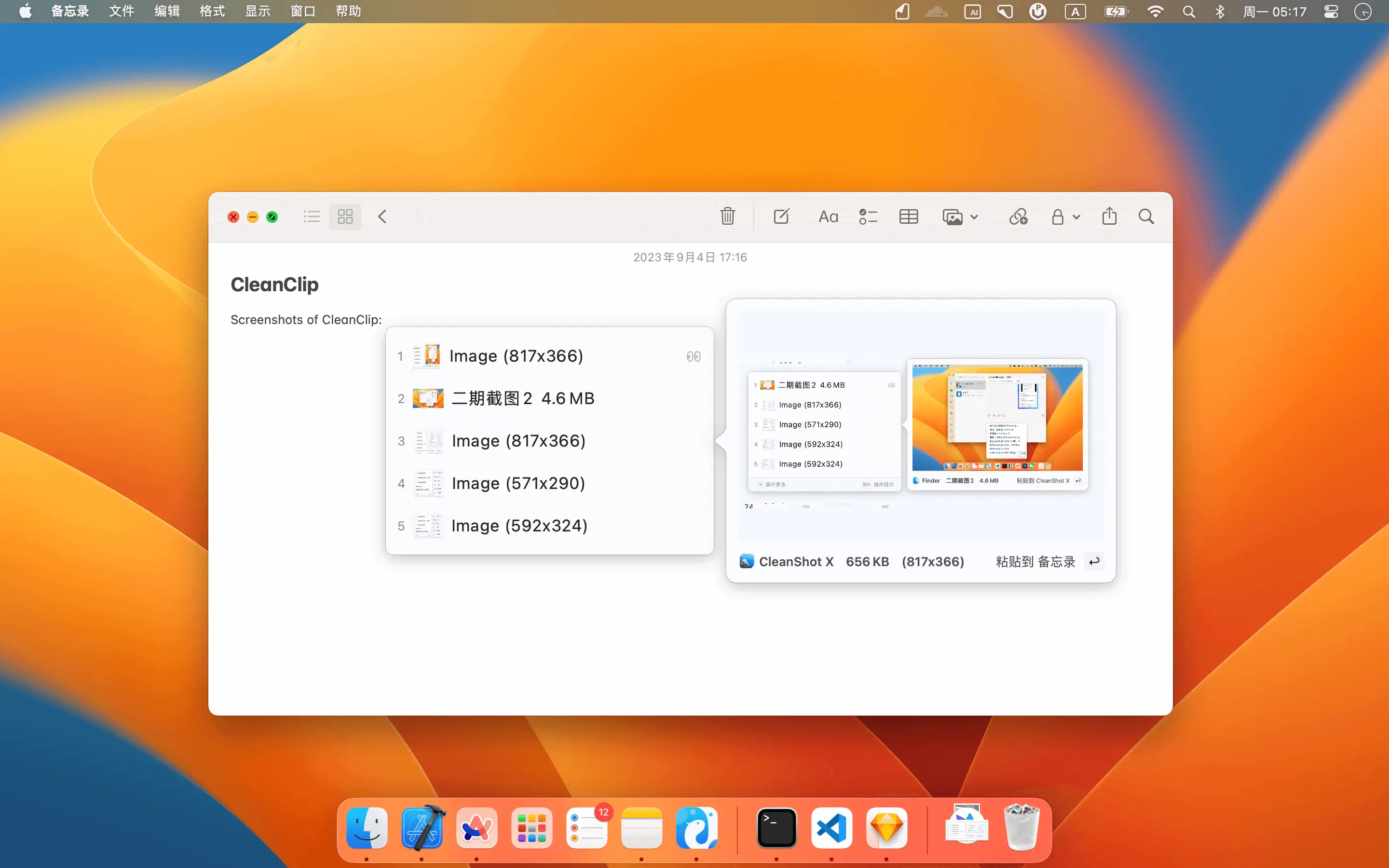
- Added support for image and file recording📖
- Added support for previewing historical records👀
- Added support for searching numbers using "fn + number keys"🔢
- Added user manual📗
# 1.1.1
Date: 2026-05-13
Archived legacy CleanClip 1.1.1 release assets.
# 1.1.0
Date: August 27, 2023
Updates
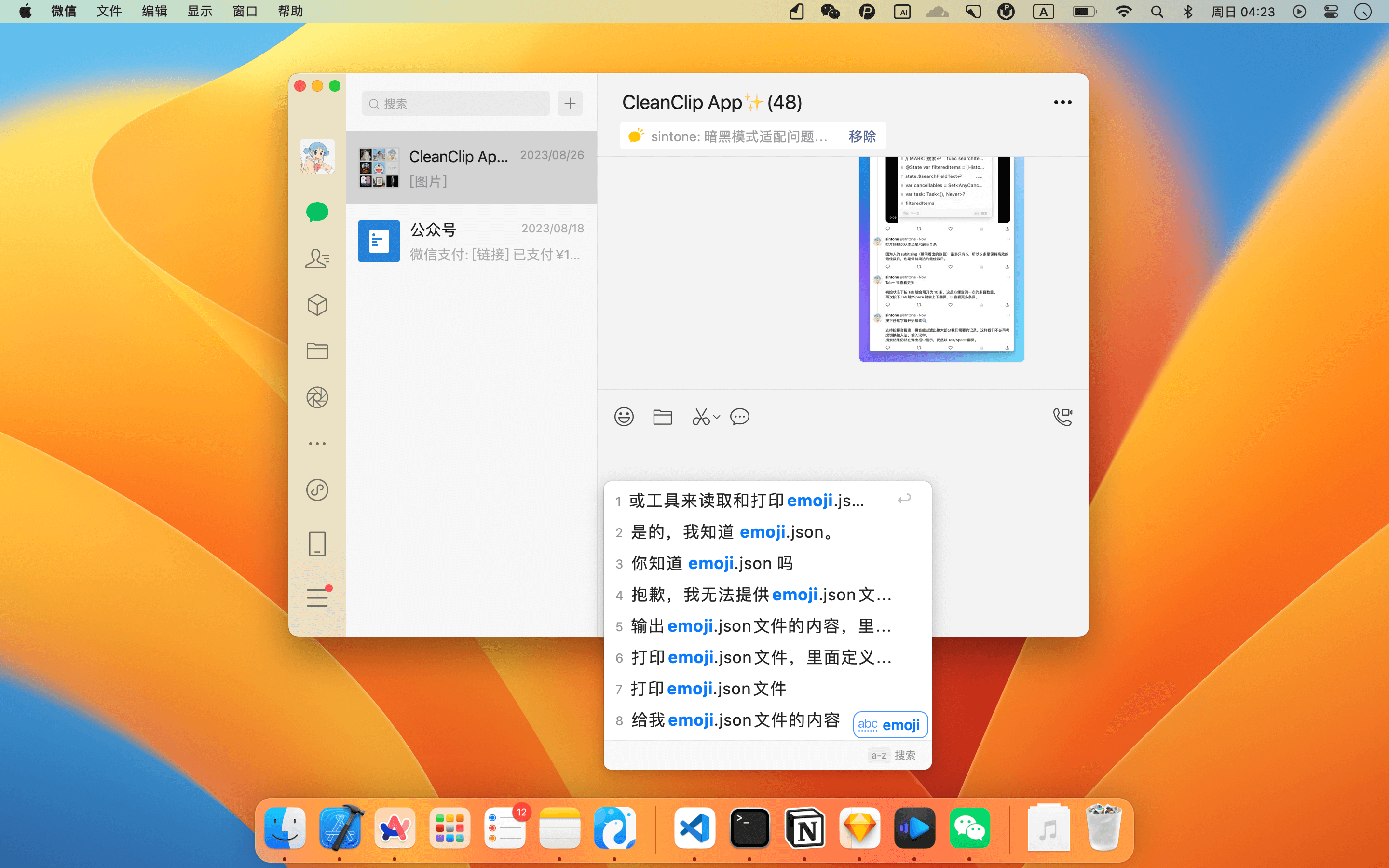
- Added support for querying more historical records📖
- Added search function🔍
- Added sound effects🎵
- Added hover details on mouseover📗
Bug Fixes:
- Fixed input format check for activation code window
- Resolved popup issue when there is no network on startup
- Fixed multi-line text copying issue in Notion
# 1.0.3
Date: 2026-05-13
Archived legacy CleanClip 1.0.3 release assets.
# 1.0.2
Date: August 23, 2023
Updates
- Fixed 404 issue with purchase link
# 1.0.1
Date: August 22, 2023
Updates
- Added support for dark mode
- Added support for automatic updates
- Adjusted UI and copy
- Fixed bug where long text was not fully pasted
# 1.0.0
Date: August 19, 2023
Updates
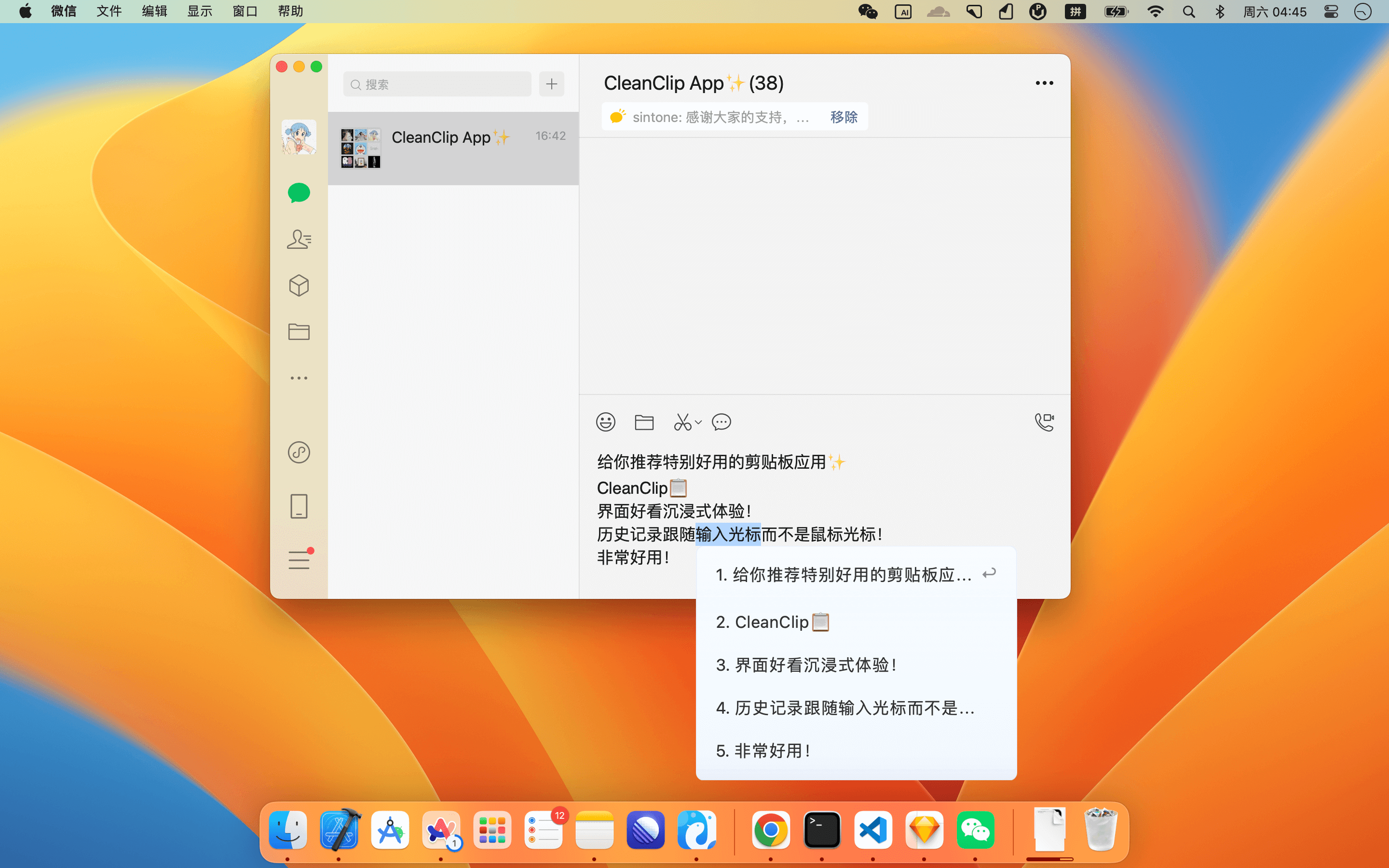
- 💡 Press "⌘ + ;" to bring up the shortcut menu
- ⌨️ Menu appears next to the input cursor
- ❤️ Immersive interactive style
- Added support for subscribing to activation codes
# 2.2.0-beta.1
Date: 2024-08-10
In this version, we mainly improved the overall visual framework, fixed a large number of bugs, and optimized the user experience.
Dark mode adaptation🌟
Support for right-click menu
Support for right-click split copy🌟
Preview can be pinned to desktop🌟
Full dark mode adaptation
Optional sound support
Shortcuts to open groups directly🌟
Rewritten settings page
Support for sf symbols display🌟
Quick menu supports viewing all lists🌟
Added shortcuts for group navigation in quick menu
Support for selecting popup alternative positions
Paste queue supports multiple orders
Paste queue supports text input after pasting🌟
Optional beta version updates
Quick menu off-screen issue
Fixed some bugs in paste queue
Resolved issue where quick menu doesn't show in some apps
Image text paste issue in some apps